


Grok Bot is xAI's agent that runs on its own cloud computer. It keeps working when your laptop is closed, and it can repeat a job on a schedule, which Grok Bot calls a routine. That makes it a good fit for the chores a small business never quite gets to: answering the lead that came in at 2pm, chasing the invoice from September, remembering what the supplier promised on Tuesday.
There is one catch. Most small-business work does not live in a tidy app. It lives in WhatsApp chats, Telegram groups, a mailbox, and maybe the database behind your shop. Grok Bot cannot see any of that until you give it a way in. Automata is a free, open-source MCP server that gives it one, and lets you choose exactly which chats, folders, and tables Grok Bot can touch.
Below are five jobs worth handing over. Each one comes with the number that makes the case, an example, the prompt to start with, and the access to give.
The example businesses and chat transcripts in this post are illustrations. Every statistic links to its source, and where a figure is our own arithmetic we say so.
The five use cases at a glance
| Use case | Automata connection | The number behind it |
|---|---|---|
| 1. Answer new leads within the hour | Only 37% of companies reply to a new lead within an hour | |
| 2. Chase late invoices | Email, WhatsApp | 56% of US small businesses are owed money, $17,500 on average |
| 3. One morning brief for every inbox | WhatsApp, Telegram, Email | Owners spend 36% of their week on admin |
| 4. Track what suppliers promised | WhatsApp or Telegram groups | 200 million people use the WhatsApp Business app each month |
| 5. Daily sales numbers on your phone | PostgreSQL, WhatsApp | Five lines at 9pm, with no dashboard to open |
What you need
- Grok Bot, on a plan that includes it. xAI has changed its plans and prices more than once since the beta opened in August 2026, so check the current pricing page before you rely on any blog post for it, including this one.
- Automata, either hosted at mcp.getautomata.app or self-hosted.
- The connection added to Grok Bot. It takes one message, shown below. Follow How to connect Grok Bot to WhatsApp or How to connect Grok Bot to Telegram. Email and PostgreSQL connections are added the same way, each with its own token.
- About ten minutes per connection.
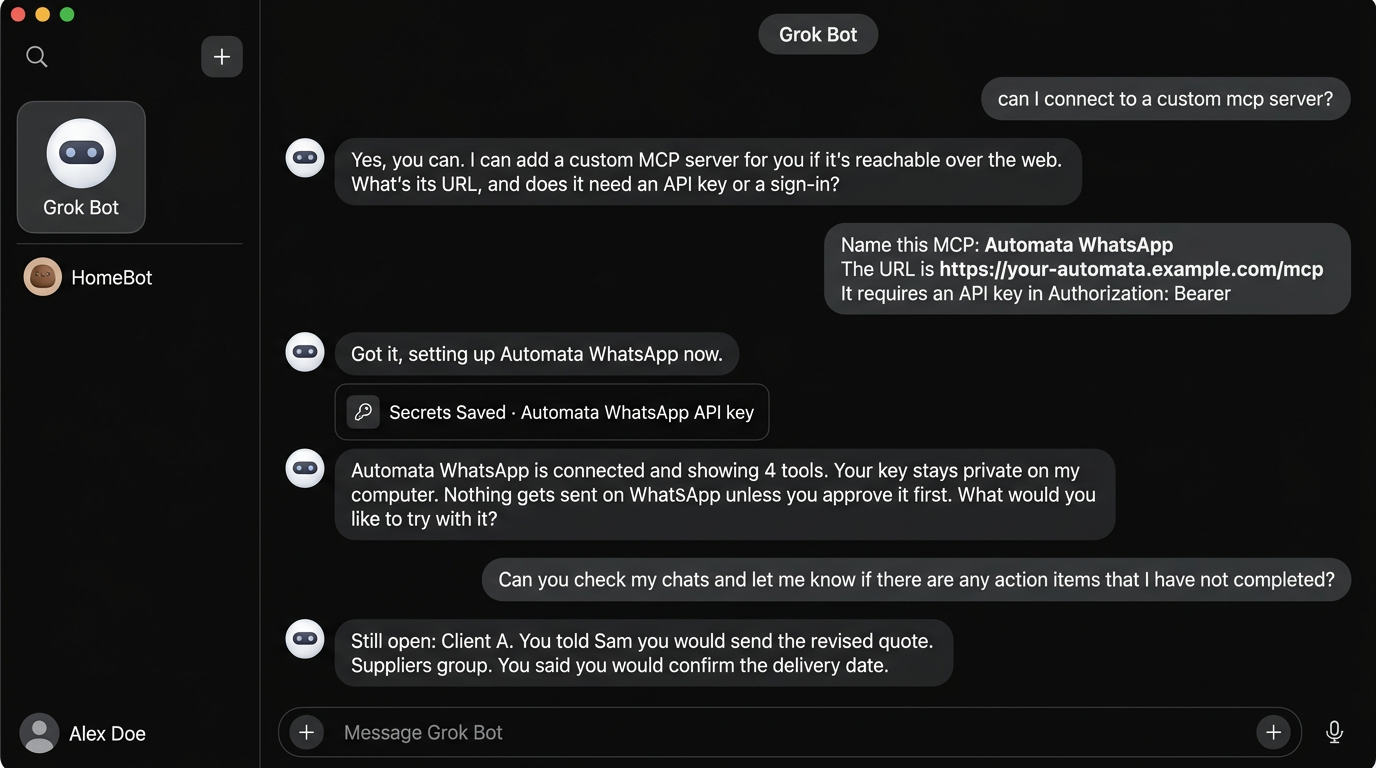
One idea runs through all five use cases: every job gets its own connector token, limited to the chats, folders, or tables that job needs. Each section says which token to create. The limits are enforced by Automata, not by the prompt, so Grok Bot cannot talk its way past them. See how permissions are enforced.
1. Answer new leads within the hour
The number
Researchers writing in Harvard Business Review audited 2,241 US companies by sending each one a test lead and timing the reply.
How fast 2,241 US companies answered a new lead
- Within 1 hour37%
- 1 to 24 hours16%
- More than 24 hours24%
- Never replied23%
63% took longer than an hour or never answered at all.
The same study found that companies that tried to reach a lead within an hour were nearly seven times as likely to qualify it as those that waited even an hour longer. Among the companies that did reply, the average wait was 42 hours.
The study is from 2011 and looked at web forms. Our view is that a chat app raises the bar instead of lowering it: someone who messages three contractors on WhatsApp usually books the first one who answers.
The example
A renovation contractor is on site all day. Between 8am and 6pm, nine inquiries arrive on WhatsApp. By the time the phone comes out at 7pm, the first of them has waited eleven hours.
With a routine, Grok Bot checks every hour and has a reply drafted for each new inquiry before the contractor's next break.
- Grok Bot:
3 new inquiries are waiting for a first reply. 1. Maria, waiting 47 min. Kitchen refit, asks for a rough price and timing. Draft: "Hi Maria, thanks for getting in touch. A kitchen that size usually runs $18,000 to $25,000. I can come and measure Thursday at 4pm or Saturday at 10am. Which suits you?" 2. New number, waiting 22 min. Asks whether you do bathroom tiling. Draft: "Hi, yes we do. Could you send a photo and the rough size of the room? I can give you a price range today." 3. Tom, waiting 9 min. Wants a quote for a deck, sent two photos. Draft: "Hi Tom, thanks for the photos. I'd like to see the ground before I quote. Are you free Thursday at 5pm?"
The prompt
Every hour from 8am to 6pm, check WhatsApp for chats whose first message
arrived today and that I have not replied to.

For each one, tell me who it is, what they asked for, and how long they
have waited. Draft a reply that answers their question, uses the price
ranges in my notes, and offers the next two free site-visit slots.

Do not send anything. Show me the drafts.
The access to give
- Chats: All chats. A new lead writes from a number that is not on any list yet, so a token limited to selected chats would never see it.
- Actions: the read tools only. Grok Bot drafts, and you copy the reply or send it yourself.
Once you trust the drafts, you can create a second token that includes send-text-message and let Grok Bot send the ones you approve.
The two settings are independent: a token that can send can send to every chat it can see. If you allow sending here, keep Grok Bot's approval prompt on so that each outgoing message is one you read first.
2. Chase late invoices
The number
- of US small businesses are owed money from unpaid invoices
- 56%
- is the average amount each of them is owed
- $17,500
- have invoices more than 30 days overdue
- 47%
The QuickBooks report also found that half of the businesses with a high volume of overdue invoices had cash flow problems, compared with 34% of those with fewer. Chasing is a weekly chore too: in a Time etc survey of 251 US entrepreneurs, 27% had chased a late payment in a typical week.
Nobody skips this job because it is hard. They skip it because it is awkward and there is always something more urgent.
The example
A four-person design studio has 12 invoices out. Every Monday at 9am, Grok Bot searches the Sent folder for invoices, checks whether each client has replied or confirmed payment, and looks at the client's WhatsApp chat for a promised date. Then it writes the reminders, and stops.
- Grok Bot:
4 of 12 invoices show no sign of payment. 1. Northside Dental, $2,400, 41 days overdue. Last word: "will sort it this week" on WhatsApp, four weeks ago. 2. Lumen Studio, $900, 23 days overdue. No reply to your email. 3. Harbor Cafe, $1,650, 16 days overdue. Asked for a corrected address on the invoice. You have not sent it. 4. Peak Fitness, $3,100, 15 days overdue. No reply to your email. I saved a reminder for 1, 2, and 4 in your Drafts folder. Number 3 is waiting on you, so I drafted the corrected invoice email instead.
- You:
Make the Northside one firmer. It is the third reminder.
- Grok Bot:
Done. The new draft names the original due date and asks for a payment date by Friday. It is in Drafts, not sent.
Notice item 3. Late invoices are sometimes waiting on you, and a chaser that reads the whole thread catches that before you send an embarrassing reminder.
The prompt
Every Monday at 9am, search my Sent folder for invoices from the last 90
days. For each one, check the Inbox and the client's WhatsApp chat for a
reply, a payment confirmation, or a promised date.

List the invoices with no sign of payment, oldest first: client, amount,
days overdue, and the last thing they said about it.

For anything more than 14 days overdue, save a short, polite reminder as
a draft reply to my original email. Do not send anything.
The access to give
- Email token: the Inbox and Sent folders, the read tools, and
create-email-draft. A new email token starts with the draft tool switched off, so turn it on. - WhatsApp token: only the client chats, read tools only.
Automata's email connection cannot send mail. The draft waits in your Drafts folder until you press send, which is the right amount of caution for a message about money.
Use Grok Bot's built-in connector for those. Automata's email connection is for mailboxes without an official connector, such as Fastmail, Zoho Mail, iCloud, Yahoo, or a mailbox at your own domain. It cannot connect Microsoft 365 or Outlook.com.
3. One morning brief for every inbox
The number
In the same Time etc survey, entrepreneurs worked an average of 45.5 hours a week and spent 36% of it on small administrative tasks.
Where a 45.5-hour week goes
- Admin
- 36%, about 16 hours
- Everything else
- 64%, about 29 hours
Time etc sells virtual assistants, so read that figure with some salt. Even at half the size it is a full working day each week, and much of it is the same loop: opening four apps to work out who is waiting on you.
The example
The owner of a six-person marketing agency talks to clients on WhatsApp, to freelancers in Telegram groups, and to the accountant by email. At 7am a routine reads all three and leaves one page in the Grok Bot app.
- Grok Bot:
Good morning. Three things need you today. DO FIRST - Harbor Cafe is waiting for the revised quote you promised on Monday (WhatsApp). - The developers ask in Telegram whether Friday's launch is still on. Two of them are blocked until you answer. - Your accountant needs the October receipts by tomorrow (email, flagged). OWED TO YOU - Priya said she would send the brand assets "by Wednesday". Nothing yet. COMING UP - Thursday 2pm: site visit with Harbor Cafe, confirmed in chat.
The prompt
Every day at 7am, write my morning brief from WhatsApp, Telegram, and
email. Look at the last 24 hours. Use this structure:

1. Do first: the 3 most time-sensitive items
2. I owe: things I promised, with who and by when
3. Owed to me: things others promised, and how long ago
4. Coming up: meetings confirmed in the next 3 days

Quote the source message for each item and say which app it came from.
Never guess. If a chat has nothing relevant, leave it out.
The "quote the source" line does most of the work: it makes every item checkable in one tap. The AI chief of staff tutorial has a longer set of instructions you can paste in as they are.
The access to give
One read-only token per connection, each limited to the chats and folders where work happens. A brief never needs to send anything, so none of the three tokens should include a send or draft tool.
4. Track what suppliers promised
The number
The WhatsApp Business app passed 200 million monthly users in June 2023, up from 50 million in 2020, and Meta has not published a newer figure. That is a lot of delivery dates, price changes, and "I'll credit you next week" agreed in a chat and written down nowhere else.
The example
A restaurant has six supplier groups. Orders go in by message, substitutions are agreed by message, and when the prawns are short the promise to make it up is a message too. Three weeks later nobody remembers who said what.
Two things help. The first is asking, at the moment you need the answer:
- You:
When did Coastal say the missing prawns would arrive?
- Grok Bot:
Thursday morning. Dan wrote in the Coastal Seafood group on Tuesday at 4:12pm: "Short 5 kg prawns today, will bring Thursday am with your regular order." Nothing after that confirms they arrived, and Thursday's delivery message lists only the regular order.
The second is a weekly routine that turns the groups into a list of open promises:
| Supplier | What they promised | By when | Status |
|---|---|---|---|
| Green Valley Produce | 40 kg tomatoes at the old price | Tuesday | Delivered, confirmed in chat |
| Coastal Seafood | 5 kg prawns to make up the short order | Thursday | No confirmation, 6 days |
| Miller's Bakery | Credit note for the stale delivery | "Next week" | No follow-up, 12 days |
| City Linen | New price list | End of month | Not due yet |
The prompt
Every Friday at 3pm, go through the supplier groups for the last 14 days.
Find every promise a supplier made: deliveries, credits, price changes,
call-backs. For each one, check whether a later message shows it happened.

Give me a table: supplier, what they promised, by when, and status. Put
the ones with no follow-through at the top, and quote the original message.
If you have connected Google Drive in Grok Bot, ask it to keep the table in a spreadsheet so that the kitchen manager can see it too.
The access to give
One token with Only selected chats: the supplier groups and nothing else. Read tools only. It works the same way for Telegram groups with a Telegram token. Your family group and your staff chat stay invisible to it.
5. Daily sales numbers on your phone
The number
This one has no survey behind it, only an observation of our own: a number you have to go and look for gets checked less often than one that arrives by itself. Five lines in a chat you already read are hard to miss.
It only applies if your orders live in a PostgreSQL database you control, for example a custom-built shop or booking system. If you sell through a hosted store platform, there is no database to connect and you can skip this one.
The example
A small online shop runs on its own database. Every evening at 9pm, Grok Bot runs a few read-only queries and sends a short summary to the two owners' WhatsApp group.
The 9pm routine starts
Grok BotIt runs on Grok Bot’s cloud computer, so nobody’s laptop needs to be open.
Read today’s orders
Automata, PostgreSQL tokenRead-only queries, allowed on three tables: orders, order_items, and refunds. The customers table is not on the list.
Write five lines
Grok BotOrders, revenue, top product, refunds, and the change against the same day last week.
Send to one chat
Automata, WhatsApp tokenThis token can send, but its chat list holds a single chat: the owners’ group.
- Owners group on WhatsApp:
Wednesday in five lines Orders: 38 (6 more than last Wednesday) Revenue: $2,914 (up 11%) Top product: linen apron, 9 sold Refunds: 1, for $42 Low stock: oak serving board, 3 left
The prompt
Every day at 9pm, query today's orders in the shop database and send a
summary to the Owners group on WhatsApp. Five lines, no more:

orders, revenue, top product by units, refunds, and anything with fewer
than 5 left in stock. Compare orders and revenue with the same weekday
last week.

If a query fails, send "Sales summary failed" and the reason. Do not
send estimates.
The access to give
- PostgreSQL token: only the tables the summary needs, with the write tool left off, which is the default. Point it at a read replica if you have one. Leave out any table that holds customer names, emails, or addresses.
- WhatsApp token: Only selected chats with one chat on the list, and
send-text-messageallowed.
This is the only one of the five where Grok Bot sends without you reading the message first. That is reasonable here because the token can reach exactly one chat, and the people in it are you. How to give Claude read-only Postgres access safely covers the database side in depth, and the same setup applies to Grok Bot.
Which one to start with
| If your biggest problem is | Start with | Why |
|---|---|---|
| Slow replies to new customers | 1. Answer new leads | It is the one tied most directly to revenue |
| Money you are owed | 2. Chase late invoices | One Monday routine, and nothing is sent without you |
| Too many apps to check | 3. Morning brief | Read-only, so there is nothing to get wrong |
| Things agreed in chats and then forgotten | 4. Supplier tracker | Read-only, and limited to a handful of groups |
| Not knowing today's numbers | 5. Daily sales | Only if you run your own database |
If you are unsure, start with number 3 or 4. Both are read-only, so the worst outcome is a brief you do not find useful. Add anything that sends only after a week of reading what Grok Bot writes.
Keep it safe
- One token per job. Five use cases means five or more tokens, each with its own short list of chats, folders, or tables. If one routine misbehaves, you revoke one token and the rest keep working.
- Read-only first. Run every routine for a week with read tools only. Add drafts or sending when the output has earned it.
- Keep approvals on for customers. Anything that goes to a customer or a client should pass your eyes first. Sending unattended belongs to internal chats like the owners' group.
- Remember where the text goes. Whatever Grok Bot reads is processed by xAI under your plan's terms. Only allow chats and tables you are comfortable sharing, and leave out anything holding other people's sensitive data.
- Start with a slow schedule. Routines use your plan's allowance each time they run. Hourly is plenty for leads, and daily or weekly for everything else.
Frequently asked questions
Can Grok Bot reply to my customers on WhatsApp automatically?
It can if the connector token includes send-text-message, but we recommend against letting it send to customers without your approval. Let it draft, read the draft, and approve the send. A read-only token cannot send at all, because Automata does not register the send tool for it.
Does this work with the WhatsApp Business app?
Yes. Automata pairs any WhatsApp account as a linked device, the same way WhatsApp Web does, and that includes the WhatsApp Business app. It does not use the WhatsApp Business API, so there is no Meta business verification.
How much does it cost?
Automata is MIT licensed and free to self-host, and the hosted version has a free tier. Grok Bot needs a paid plan from xAI, and those plans have changed several times since launch, so check xAI's current pricing.
Do I need Grok Bot for this, or will another assistant work?
The same tokens work with any MCP client. Grok Bot's advantage is the routine: it runs on a schedule without your computer. You can do the same jobs on demand from Claude or ChatGPT.
Can Grok Bot see all of my chats?
Only the ones on the token. A token set to Only selected chats makes every other conversation invisible to it, and that check happens in Automata on every request, not in the prompt.
Next steps
- Set up the connection with How to connect Grok Bot to WhatsApp or How to connect Grok Bot to Telegram.
- Go deeper on the morning brief with the free AI chief of staff tutorial.
- Read how Automata enforces permissions before you create a token that can send.
- See what each tool does on the WhatsApp MCP, Telegram MCP, and Postgres MCP pages.
Comments
Questions, corrections, or your own setup? Join in below. Pick any name to post.