
Nango and Automata both sit between an AI agent and the accounts it works with, and both speak MCP. That is most of what they have in common. They are built for different people.
Nango is integration infrastructure for software companies. You build a product, your customers connect their Salesforce, Slack, or Gmail to it, and Nango handles the OAuth, stores the tokens, and runs the tools, syncs, and triggers. Automata is an MCP server for your own accounts. You connect your WhatsApp, Telegram, mailbox, or Postgres database, paste a token into Claude or ChatGPT, and decide which chats, folders, and tables that client may touch.
We build Automata, so read this with that in mind. Every claim about Nango links to Nango's own pages or repository, checked on November 12, 2026, and the full list of sources is at the end. Where Nango is ahead, this post says so.
Choose Nango if you are building a product whose customers connect their own SaaS accounts, and you need breadth, managed OAuth, and compliance paperwork. Choose Automata if you want an AI client you already use to work with your own messages, mail, or database, with limits on exactly what it can read. They overlap less than the category names suggest, and you can run both.
At a glance
| Automata | Nango | |
|---|---|---|
| Built for | You or your team, connecting your own accounts | Software companies whose customers connect theirs |
| Integrations | 4: WhatsApp, Telegram, IMAP email, PostgreSQL | 1,241 APIs in its catalog |
| License | MIT | Elastic License 2.0 |
| Free self-hosting | The full product | Auth and proxy only; no tool calls or MCP server |
| Full self-hosting | Free, with Docker or Railway | Enterprise plan |
| Hosted price | Free for 1 connection; Pro $19 a month | Free for 10 connections; then $50 a month plus usage |
| How an agent connects | Paste a token into Claude, ChatGPT, or Cursor | Your backend creates a session of up to 15 days |
| Permissions | Per tool, plus per chat, folder, and table | Per integration and per tool |
| Your own account, with groups and history | WhatsApp Business API, no pre-built tools | |
| Telegram | Your own account, with history | Bot API, no pre-built tools |
| Compliance | None | SOC 2 Type II, GDPR, HIPAA |
| Project maturity | New, small team, under 100 GitHub stars | 13.2k stars, 291 contributors, 215 releases |
What each product is
Nango describes itself as "an open-source platform for building agent integrations" with "10,000+ prebuilt tools across 1,000+ APIs" (GitHub README). Its building blocks are auth, tools exposed over MCP, triggers, data syncs, a request proxy, and a unified API (nango.dev). In April 2026 it announced a $7.5M seed round led by Gradient, and said more than ten thousand engineering teams had used it, with Replit, Mercor, Ramp, and Motion among its customers (Nango blog).
Automata is much smaller. A connection is exactly one WhatsApp account, Telegram account, mailbox, or Postgres database. Each AI client gets a connector token, and the token decides which tools it can call and which chats, folders, or tables those tools can reach. Automata checks that on the server on every request. See how Automata works.
The clearest difference is who sits at each end of a request.
Nango
Your product acts on your customers' accounts
An agent in your product
Built with the OpenAI, Anthropic, Vercel AI, LangChain, or Mastra SDK
Your backend creates a session
It picks the customer, the toolset, and an expiry of up to 15 days
Nango
Holds your customers' credentials and runs tools, syncs, and triggers
Your customers' accounts
Salesforce, Slack, Gmail, and 1,200+ other APIs
Automata
Your AI client acts on your own accounts
An AI client you already use
Claude, ChatGPT, Cursor, Grok Bot, or another MCP client
A connector token
Pasted into the client once, scoped to tools and to chats, folders, or tables
Automata
Checks the token's scope on every request, on your server or ours
Your own accounts
WhatsApp, Telegram, an IMAP mailbox, a Postgres database
That difference shows up in setup. Nango's agent sessions are created by code: "Your backend creates the session and exposes it to the agent as an MCP server" (agent sessions guide). The guide's examples are for agent SDKs, not for the connector box in Claude or ChatGPT, and a session lasts 15 days at most, so a person using Nango from a chat client would need to mint a new one every two weeks. An Automata token is made in a dashboard and pasted into the client, and you choose whether it expires in 30 days, 90 days, a year, or never.
The gap in breadth is just as large, in the other direction.
Integrations in each catalog
- Nango1,241
- Automata4
If your agent needs Salesforce, HubSpot, Jira, or Google Drive, Automata does not have them and Nango does.
Open source: MIT and the Elastic License
Both projects publish their server code, which is more than many hosted integration platforms do. You can read how Nango stores credentials, and you can read how Automata applies a chat allowlist. The licenses are different.
Automata is under the MIT license. You can run it, change it, sell it, or host it for other people.
Nango is under the Elastic License 2.0. Its README says "Nango is fully open source", and the code is public, with 291 contributors. The license adds two limits that MIT does not have. Quoting it:
You may not provide the software to third parties as a hosted or managed service, where the service provides users with access to any substantial set of the features or functionality of the software.
You may not move, change, disable, or circumvent the license key functionality in the software, and you may not remove or obscure any functionality in the software that is protected by the license key.
The Elastic License is not on the Open Source Initiative's list of approved licenses, so "source-available" is the more precise term. For most teams this changes nothing: you can read the code, modify it, and run it inside your company. It matters if you planned to offer Nango itself as a service, or to switch on the license-keyed features without a plan.
Self-hosting: what the free edition includes
Both products can be self-hosted. What you get for free is different.
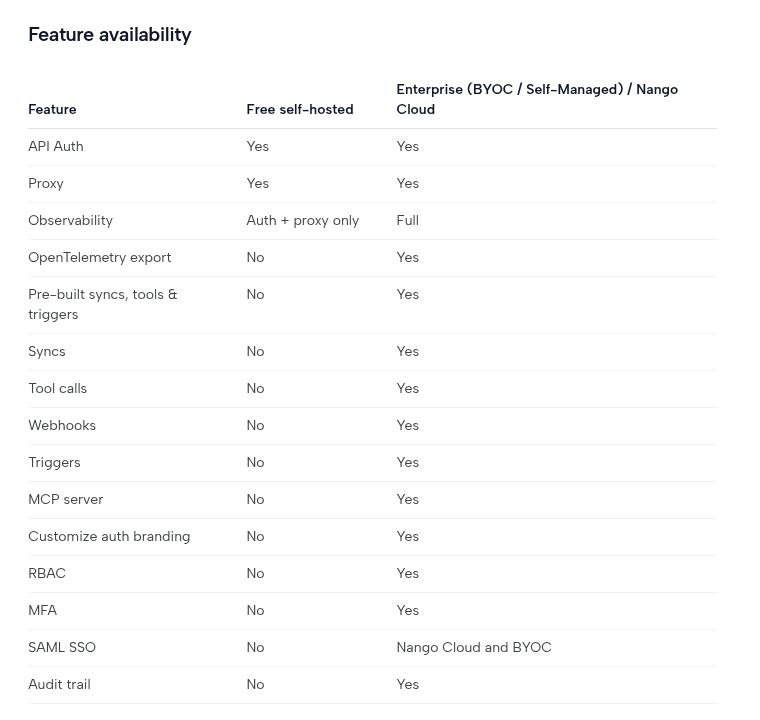
Nango's docs describe three ways to run it outside Nango Cloud (self-hosting guide):
- BYOC. Nango deploys and operates an instance inside your AWS, GCP, or Azure account.
- Self-Managed. You run it yourself with Nango's Helm chart.
- Free self-hosting. A Docker Compose file, described as "a limited free self-hosting option" that is "available for hobby projects" and "intended for lightweight deployments that need Auth and Proxy".
The first two include every paid feature, and the docs say "both paths require an Enterprise plan subscription and are intended for large and/or regulated organizations". The free edition leaves out the parts an AI agent uses.
Automata has one edition. The self-hosted server is the same software as the hosted service, with every connector and the MCP endpoint included:
git clone https://github.com/ju-li/automata-mcp.git && cd automata-mcp
cp .env.selfhost.example .env
# fill in the generated secrets and your public URL
docker compose up -d
Here is how the two free self-hosted editions compare, next to Nango's paid ones.
What each self-hosted edition includes
| Feature | Nango, free | Nango, Enterprise | Automata, free |
|---|---|---|---|
| Stores credentials | Yes | Yes | Yes |
| Proxy to any API endpoint | Yes | Yes | Not offered |
| MCP server | No | Yes | Yes |
| Tool calls | No | Yes | Yes |
| Custom tools in code | No | TypeScript | Fork the server |
| Data syncs | No | Yes | Messages and mail headers only |
| Webhooks and triggers | No | Yes | No |
| Roles | No | RBAC | Administrator and member |
| Two-factor sign-in | No | Yes | Yes |
| SAML SSO | No | BYOC only | No |
| Record of tool calls | No | Logs and audit trail | Optional 30-day history |
Nango's Enterprise edition does more than Automata in most rows. The point is narrower: if you want to self-host an MCP server for agents without a contract, Nango's free edition does not include one, and Automata's does. If you want Nango's full feature set on your own infrastructure, it exists, and the docs say its pricing is "a fixed annual license and maintenance fee, plus a fraction of the Cloud usage-based fees".
Self-hosting Automata is not free of work. You run the server, put TLS in front of it, and look after its database. The self-hosting guide covers Docker, and there is a one-click Railway template if you would rather not.
Price
Nango's cloud has three plans (pricing).
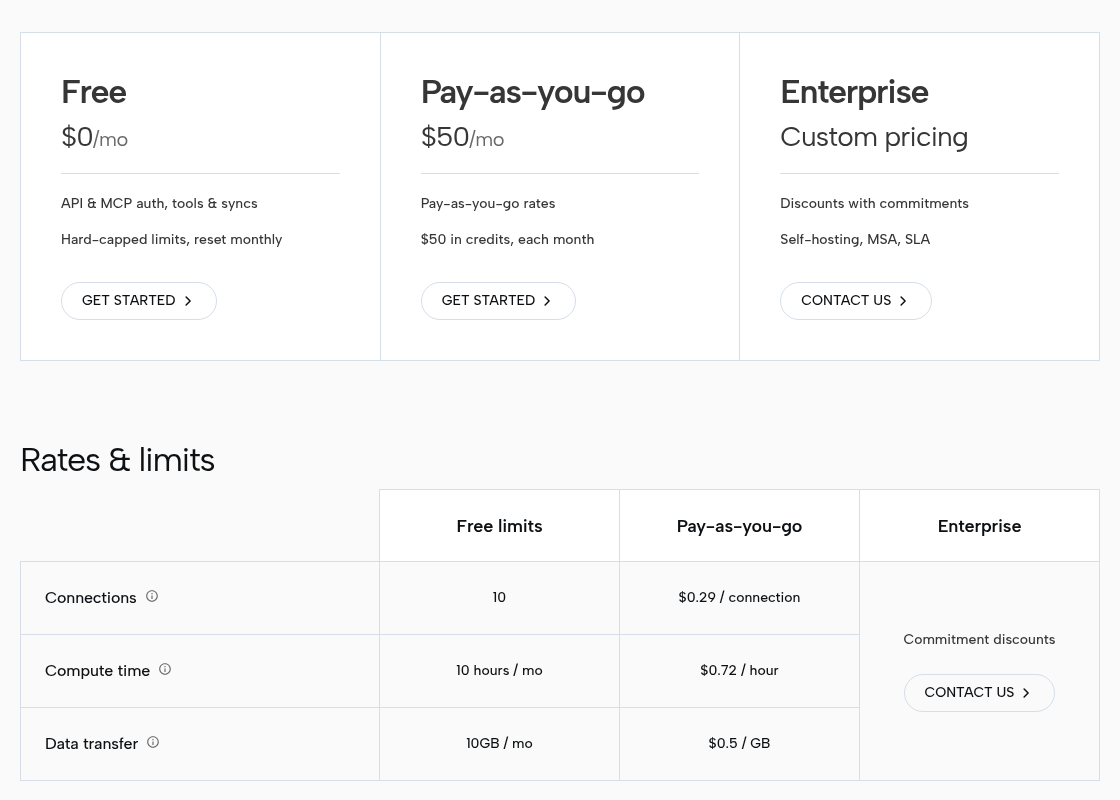
- Free, $0. 10 connections, 10 compute hours, and 10 GB of data transfer a month, with hard caps. Tools, syncs, and webhooks are included.
- Pay-as-you-go, $50 a month. The fee comes back as $50 of credit, then $0.29 per connection, $0.72 per compute hour, and $0.50 per GB.
- Enterprise, custom. Self-hosting, an MSA, an SLA, and volume discounts.
A Growth add-on at $450 a month adds RBAC, SAML SSO, HIPAA, real-time log export, and a shared Slack channel. SOC 2 Type II is listed from Pay-as-you-go up.
Automata's pricing is flatter. Self-hosting is free with no usage meter. The hosted service is free for one connection, one connector token, and one user. Pro is $19 a month after a 7-day trial, with unlimited connections and tokens and five users included, then $10 per extra user.
Monthly list price by number of connections
1 connection
- Nango Cloud$0
- Automata hosted$0
- Automata self-hosted$0
10 connections
- Nango Cloud$0
- Automata hosted$19
- Automata self-hosted$0
25 connections
- Nango Cloud$50
- Automata hosted$19
- Automata self-hosted$0
100 connections
- Nango Cloud$50
- Automata hosted$19
- Automata self-hosted$0
Up to 10 connections, Nango's free plan costs less than hosted Automata. Past that, Nango's $50 minimum applies.
Three things the chart cannot show:
- A connection is not the same unit. Nango counts one connection per API key or access token of an external API, usually one per customer per integration. An Automata connection is one account or database of yours.
- Nango's bill also depends on usage. Compute time and data transfer draw on the same $50 credit, so a busy agent on 25 connections can cost more than $50. Automata has no usage meter on any plan.
- Self-hosted Automata is not zero cost. You pay for a server and your own time.
If you have a handful of connections and are happy on a hosted service, Nango's free plan is more generous than ours.
Permissions: tools, and what is behind the tools
Both products limit which tools an agent may call. They differ on what happens after that.
A Nango agent session has a toolset: an allowlist of integrations, with allow and deny lists of tools for each. Integrations left out of the toolset are denied, the agent "never sees raw credentials, and cannot change the scope of its own session", and sessions expire. Nango's docs are direct about where that control stops (agent sessions guide):
allowanddenylimit which tools the agent can call, not which API endpoints it can reach.
That warning is about nango_proxy, a meta tool that lets the agent call any endpoint of a connected integration. It is off by default, which is the safe choice. With it off, an agent is limited to the tools you allowed, but a tool such as "list messages" reaches whatever the underlying credential can reach. Narrowing that further is done with the provider's own OAuth scopes, or by writing a custom tool in TypeScript that applies your rule.
Automata adds a second gate on resources, set per token in the dashboard:
- Chats. A WhatsApp or Telegram token lists only the chats you allowed. Reads and sends to any other chat are refused, and search is narrowed inside the query.
- Folders. An email token sees only the IMAP folders you allow. It can save drafts and cannot send.
- Tables. A PostgreSQL token hides other tables, and Automata checks the query plan of every statement, refusing any that touches a table off the list. See how to give Claude read-only Postgres access safely.
Token scope

WhatsApp chats
send-text-message · search-messages
- Read + write
Design team
WhatsApp group
- Read
Investor updates
WhatsApp group
- Blocked
Family
WhatsApp group
PostgreSQL tables
query · execute
- Read
public.orders
PostgreSQL table
- Read + write
public.inventory
PostgreSQL table
- Blocked
private.payroll
PostgreSQL table
Out-of-scope call refused
private.payroll · permission_denied
What each permission model can limit
| Limit | Nango agent session | Automata connector token |
|---|---|---|
| Which integration or account | Toolset allowlist; tags pick the connection | One token, one connection |
| Which tools | allow and deny per integration | A chosen subset per token |
| Which API endpoints | Any endpoint once nango_proxy is on; off by default | Fixed tools only; there is no raw proxy |
| Which chats, folders, or tables | Not in the session; use provider scopes or custom tool code | Allowlist checked on every request |
| Expiry | 60 seconds to 15 days | 30 days, 90 days, 1 year, or never |
| Change the scope later | Sessions are immutable; create a new one | Edits apply on the next call |
Neither model is wrong. Nango's is built for a backend that mints a short session per task, for one customer at a time. Automata's is built for a long-lived token in a chat client, where the question is "which of my conversations can this model see". See tokens and permissions.
WhatsApp, Telegram, email, and Postgres
These four are all Automata does, so it is worth checking what Nango offers for each.
WhatsApp. Nango's integration is for the WhatsApp Business API, and its page says "No pre-built syncs or tools available yet" (Nango docs). You get credential storage and a proxy, and write the tools yourself. That is the right base for a business messaging its customers from a business number. Automata pairs your existing WhatsApp account as a linked device, as WhatsApp Web does, so an AI can read and search the private chats and groups you allow (WhatsApp MCP).
Telegram. Nango's integration is the Telegram Bot API, authorized with a bot token from @BotFather, again with no pre-built tools (Nango docs). A bot sees only the chats it has been added to. Automata links your own Telegram account and backfills history up to limits you set (Telegram MCP).
Email. Nango has OAuth integrations for Gmail and Outlook, which is the cleaner route for both. Automata connects one mailbox over IMAP with an app password, and cannot connect Microsoft 365 or Outlook.com, because Microsoft requires OAuth.
PostgreSQL. Nango's catalog has no entry for a plain Postgres connection. It lists Supabase, Neon, Snowflake, and BigQuery, which are reached through those vendors' APIs. Automata connects to any Postgres database with a connection string and enforces a table allowlist.
What is stored and logged
Both products hold credentials and some data on your behalf. Here is what each keeps, and for how long.
| Automata | Nango | |
|---|---|---|
| Who holds the credentials | You, when self-hosted; us, on the hosted service | Nango, on Nango Cloud; you, when self-hosted |
| Logged per call | Tool name, success, client, and the model's one-line reason, when telemetry is on | URL, method, status code, and headers; "never request or response bodies" |
| Log retention | 30 days | 15 days on Nango Cloud; audit trail 1 year |
| Content kept | WhatsApp and Telegram messages and mail headers, so tools can search them | Synced records, if you use the records cache, pruned after 30 days without an update |
| Compliance | None | SOC 2 Type II, GDPR with a DPA, HIPAA with a BAA on the Growth add-on |
Sources: Nango's security page and observability page; Automata's security guide and telemetry docs.
Two points follow from that table.
Neither product logs payloads. Nango's logs leave out request and response bodies. Automata's telemetry never records tool arguments, results, message content, or query rows, and is off by default when self-hosted.
The custody question depends on the plan. On Nango Cloud, Nango holds your customers' tokens. On hosted Automata, we hold yours. Both can keep credentials on your own infrastructure for free. The difference is what else runs there: Automata's free edition serves tool calls over MCP, and Nango's free edition stops at auth and the proxy, with the rest on an Enterprise plan. We found no security breach disclosed by Nango. Its status page lists availability incidents, including a June 2026 outage of the service that runs syncs, actions, and webhooks, which is a reminder that any hosted layer, ours included, is a dependency.
Where Nango is the better choice
For many teams Nango is simply the right product, and Automata is not a substitute.
- You are building a product. White-label connect screens, per-customer connections, tags for tenant isolation, and an SDK are what a SaaS company needs. Automata has none of them. It is for connecting your own accounts.
- Breadth. 1,241 APIs against 4.
- Managed OAuth. Nango runs the OAuth flow and refreshes tokens, with Nango-managed developer apps so you can start without registering your own. Automata has no OAuth connectors at all.
- Syncs, triggers, and webhooks. Nango can keep a copy of external data fresh for RAG and push events to your agent. Automata only answers requests.
- Custom tools. With Nango you write a tool in TypeScript and deploy it. With Automata you would fork the server.
- Compliance. SOC 2 Type II, a DPA, a BAA, and a published security page that documents its encryption and retention. Automata has no certifications.
- Maturity. Nango has 13.2k GitHub stars, 291 contributors, 215 releases, and a funded company behind it. Automata is new and maintained by a small team.
- Official APIs. Nango's WhatsApp integration uses Meta's Business API. Automata's uses the linked-device protocol, which is what lets it read personal chats, but it is not an official Meta API, and pairing a number carries some risk of restriction by WhatsApp.
Which should you choose?
Choose Nango if:
- you are building software in which your customers connect their own accounts;
- you need many SaaS integrations, managed OAuth, syncs, or triggers;
- a vendor's SOC 2 report or BAA is a requirement;
- you have 10 or fewer connections and want a hosted free plan.
Choose Automata if:
- you want Claude, ChatGPT, or Cursor to work with your own WhatsApp, Telegram, mailbox, or Postgres database;
- you need to limit access to specific chats, folders, or tables, not just specific tools;
- you want to self-host a complete MCP server for free, without a sales call;
- you want an MIT license.
Choose neither if you need one of the big SaaS apps inside a chat client and nothing else. The connectors built into Claude and ChatGPT, or the vendor's own MCP server, are usually the shortest path.
Use both if you are building a product on Nango and also want your own team's chats or database available to your AI clients. They are separate MCP servers and do not conflict. See the MCP clients guide.
Frequently asked questions
Is Nango open source?
Nango's code is public on GitHub under the Elastic License 2.0. You can read, modify, and self-host it, but you may not offer it to others as a hosted service or bypass its license key checks. The Elastic License is not approved by the Open Source Initiative, so it is more precisely source-available. Automata is under the MIT license.
Can I self-host Nango for free?
Yes, with limits. Nango's free self-hosted edition covers auth and the API proxy. Its docs list tool calls, syncs, webhooks, triggers, and the MCP server as not included. The full feature set on your own infrastructure needs an Enterprise plan. Automata's self-hosted edition is the whole product and is free.
Is Nango cheaper than Automata?
It depends on the size. Nango Cloud is free for up to 10 connections, and hosted Automata is free for one. Past the free tiers, Nango starts at $50 a month plus usage, and hosted Automata Pro is $19 a month with unlimited connections. Self-hosted Automata has no license fee.
Does Nango work with Claude or ChatGPT?
Nango exposes tools over MCP through agent sessions, which any MCP client can reach. Sessions are created by your backend through its API and last at most 15 days, so Nango fits agents inside a product better than a connector pasted into a chat app. Automata gives you a URL and token to paste into Claude, ChatGPT, or Cursor.
Can Nango read my personal WhatsApp or Telegram chats?
Not as documented. Nango's WhatsApp integration is for the WhatsApp Business API and its Telegram integration is for the Bot API, and neither has pre-built tools. Automata links your own WhatsApp or Telegram account, so an AI can read the chats and groups you allow.
Can I use Automata and Nango together?
Yes. They are separate MCP servers. A company can build its product integrations on Nango and still use Automata to give its own team's AI clients scoped access to chats, mail, and a database.
Next steps
- Try Automata: sign up for hosted, deploy on Railway, or self-host with Docker.
- Connect a first client: WhatsApp to Claude, Claude to Telegram, or Claude to email.
- Try Nango: its quickstart and free plan take a few minutes.
- Read the other comparison: Automata vs Composio.
Sources
All checked on November 12, 2026.
Nango
- nango.dev: product description, "1,200+ APIs", compliance labels.
- Pricing: plans, rates, free limits, the Growth add-on, and which plan includes which feature.
- GitHub repository: README, stars, contributors, and releases.
- LICENSE: the Elastic License 2.0 text.
- Self-hosting guide: BYOC, Self-Managed, free self-hosting, and the feature availability table.
- Agent sessions guide: toolsets, meta tools, expiry, and the
nango_proxywarning. - Tools guide: custom tools in TypeScript.
- Security: encryption, retention, deletion, and compliance.
- Observability: log retention.
- API catalog: the 1,241 providers, and the absence of a plain PostgreSQL or IMAP entry.
- WhatsApp Business and Telegram integration pages.
- Funding announcement: the seed round and customer figures.
- Status page incident: the June 2026 post-mortem.
Other
Automata
- Repository and README: license and hosted plans.
- Tokens and permissions, telemetry, security, organizations and roles, and two-factor authentication.
Nango ships often, and its pricing, limits, and docs will change. If something here is out of date or unfair to Nango, tell us and we will correct it.
Comments
Questions, corrections, or your own setup? Join in below. Pick any name to post.